Your first useful loop
- Press Roll near the bottom-right of the battle screen. Open its Auto option if you want repeated rolls.
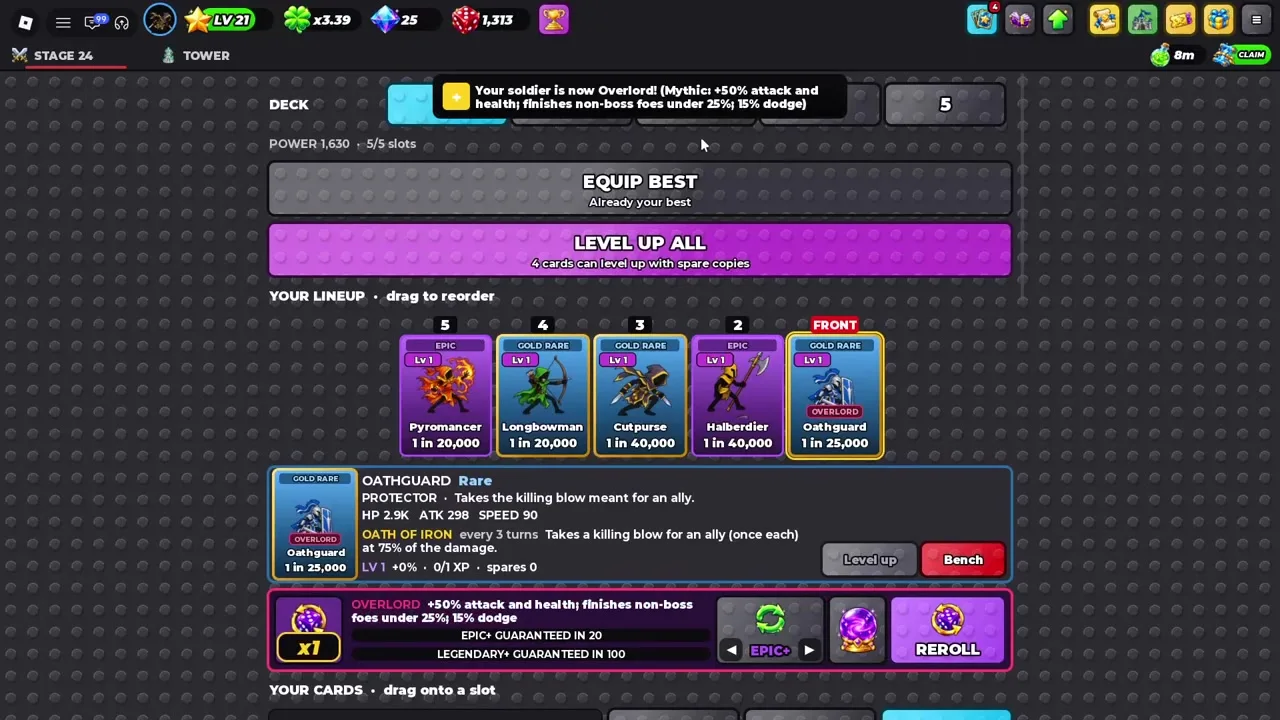
- Open Army using the card icon at the top. Start with Equip Best to fill unlocked slots from the cards you own.
- Read the selected card’s role and ability. Drag cards in Your Lineup to reorder them; the slot labelled FRONT is on the right.
- Return to Story/stages and watch a full fight. If the front collapses before abilities trigger, change its protection or position before spending rare resources.
- Claim codes and visible rewards, then inspect what was added. Packs, Tomes and trait rerolls do different jobs.
Three systems to keep separate
| System | Where you see it | What to do first |
|---|---|---|
| Account level | Star and LV at the top; open the stat panel | Spend stat points for the goal you are pursuing. |
| Card level | A selected card in Army | Use spare copies; consider Tomes for an important low-level card. |
| Card border | Gold, Rainbow or VOID around the card | Read the border and rarity together before comparing cards. |
Level Up All uses available spare copies across eligible cards. Read the selected card and keep a useful team before you use your scarce Tomes or rerolls. Tomes only grant levels up to 21; they do not finish a card all the way to the observed level-51 cap.
Controls and mobile use
The visible actions use buttons and card selection: Roll, Army, Equip Best, Level Up, Bench/Field, mode tabs and the menu. Click these on desktop. On touch screens, start with the same labelled controls and check that a card’s detail panel opens before you drag its position. We have desktop footage, not a verified controller/keybind map or a mobile game playtest; no special keyboard shortcut is required by this guide.
The website’s team builder lets you draft a back-to-front arrangement before changing Army. Use progression when you need the next unlock, and the rolls guide when rolls run low.